
SOFTWARE PACKAGESFEATURESBook a DemoASI ENGINEERING
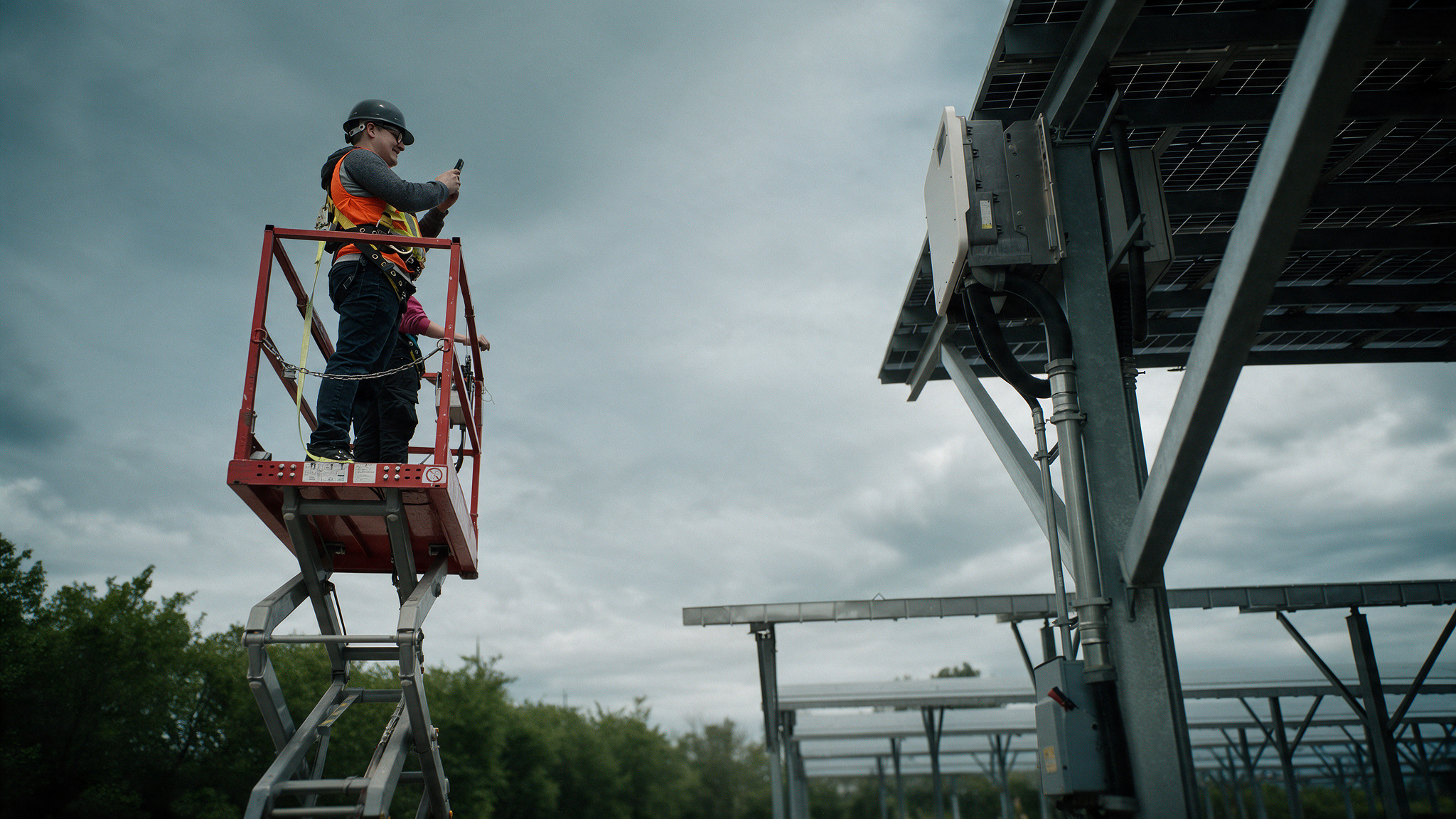
Field inspector on a lift photographing a solar canopy with a mobile phone
Platform features

Built for the way you manage infrastructure

Work orders, inspections, AI road condition, safety, meeting intelligence and 3D digital twins on one platform. Your whole team works from the same data, in the office and in the field, on desktop, tablet and mobile.

6 features · 1 coming soon

Explore the features

01
Work Orders
Create, assign and track maintenance tasks connected to your assets.
Learn more →
02
Inspections
Complete field inspections with customizable forms.
Learn more →
03
Roadway Asset Condition Management
Understand the condition of your road network and plan what to fix first.
Learn more →
04
Safety & Compliance Management
Keep inspections, safety checks and corrective actions organized.
Learn more →
05
AI Meeting Intelligence
Turn meetings into clear summaries so important follow-ups stay visible.
Learn more →
06
Digital Building Twin
Extend your ASI Software workspace with a digital twin of your buildings.
Learn more →
Coming soon
Climate Adaptation Planner
Helping communities prepare their infrastructure for a changing climate.
Learn more →
Desktop + mobile

Plan at your desk. Work in the field.

Every feature runs on the same secure, cloud-based platform. Build plans and reports on a desktop browser, then complete inspections, work orders and updates on a phone or tablet. Your data stays in sync.

App StoreGoogle Play
ASI Software dashboard shown on a laptop, tablet and phone
Desktop · Tablet · Mobile
On desktop

Capital planning, reporting and asset management plans on a full screen.

On mobile

Field inspections, photos, work orders and updates on site.

One platform

Secure cloud access, unlimited users and storage that scales with your package.

Feature 01

Work Orders

Create, assign and track maintenance tasks connected to your assets.

  • Tasks linked directly to assets
  • Priorities, photos and field updates
  • Track work from assignment to completion
Available on desktop · tablet · mobile
ASI SOFTWARE/Field OperationsSearch work orders, assets, tags...+ New Work OrderWork OrdersCreate, assign and track maintenance tasks connected to your assets.42 ACTIVEExport CSVOPEN ORDERS37DUE THIS WEEK37HIGH PRIORITY19COMPLETED5All Maintenance Tasks1–25 OF 42MH-4 MaintenanceSEP 8 • OVERDUEWO-2026-00001Asset:MH-4(Manhole)Location: Willow St / 13th Ave •UnassignedClean Hydrant FlushAUG 20 • OVERDUEWO-2026-00001Asset:HYD-15(Hydrant)Distribution Flow Line Check •UnassignedMain Valve Pressure TestAUG 28 • OVERDUEWO-2026-00001Asset:WV-7(Water Valves)CRITICAL PRIORITY • Isolation DefectGeorgia Hotel - Elevator InspectionAUG 27 • OVERDUEWO-2026-00001Asset:Georgia Street Hotel(Building)High Priority • Vertical Transit SafetyBRD - 3 - Bridge InspectionCOMPLETEDWO-00026Asset:BRD-3(Bridge Structure)Assigned: Darren Wiebe • Signed OffWO-2026-00001MEDIUM PRIORITYMH-4 MaintenanceManhole Chamber Silt & Ring DefectASSETMH-4ManholeLOCATIONWillow St / 13th Ave49.2596, -123.1219DUE DATESep 8, 2026OverdueASSIGNEDUnassignedReq: Kevin BrandinoDocuments:No File Cabinet attachments for assetACTIVITY TIMELINE (1–5 OF 6)Oct 14 • Title updatedRecentAug 26 • Assignee updatedAssigned to UnassignedAug 25 • Assignee updatedAssigned to Enrico Manalang, Kevin BrandinoAssign Crew & Re-dispatch"CONFIDENCE IN MANAGING YOUR INFRASTRUCTURE"Rows per page:25• Page 1 of 2

What Work Orders gives you

Every job your crews do, tied to the asset it was done on. Nothing gets lost between the office and the field.

Included in Standard and Pro packages

Work linked to assets

Each work order sits on the asset record, its map location and its full history, so crews know exactly what and where.

Priorities and due dates

Critical, overdue and due-this-week work is surfaced at a glance, so the urgent jobs get done first.

Crew assignment and dispatch

Assign work to a crew or a person and re-dispatch in seconds when plans change.

Photos, documents and field notes

Crews attach photos and updates from the field, so the office sees the job as it happens.

Activity timeline

A running record of every update, reassignment and sign-off on each work order.

Export and reporting

Export work order lists to CSV for reports, budgets and council or board updates.

How it works

  1. Create a work order from an asset, an inspection finding or a request.
  2. Set the priority and due date, then assign the crew.
  3. The crew completes the job on mobile and adds photos and notes.
  4. Sign it off. The work is recorded against the asset's maintenance history.

Built for

Public works, facilities and maintenance teams running work across many assets.

Feature 02

Inspections

Complete field inspections with customizable forms.

  • Customizable inspection forms
  • Condition ratings and deficiencies
  • Follow-up actions
Available on desktop · tablet · mobile
ASI SOFTWARE/Field InspectionsSearch inspection templates, assets...+ New TemplateInspection FormsAssign standardized condition assessment forms to municipal infrastructure assets.3 TEMPLATESAvailable TemplatesActive (1)Municipal InfrastructureInspection2 SECTIONS✓ Selected for assignmentRoad InspectionForm2 SECTIONSPCI & Surface Rutting DefectStreetlight PoleInspection Form3 SECTIONSStructural Base & ElectricalNeed a Custom Schema?Create condition assessments withcustom PoF/CoF defect ratings,geotagged photos, and drop-downs.Build FormAssign to AssetExisting AssetNew AssetAUTO-FILLED24 Street NW osm-159579642...Retaining Walls • Concrete Gravity24 Street NW osm-159579642 (Retaining Walls · 1155 Vernon Dr, Vancouver, BC)Retaining Walls — Primary Structural BarrierSelected2ST-ADV-001 (Casework)Casework — Architectural Millwork Component2ST-UNC-001 (1155 Vernon Dr, Vancouver, BC)Linear Right-of-Way Retaining Segment2ST-UNC-002 (1155 Vernon Dr, Vancouver, BC)Sub-surface Drainage & CatchmentAsset DetailsSubmission MetadataLOCATION 1Vernon Drive Corridor — Zone 4BUILDING / STRUCTURERetaining Wall #12 — North WingLOCATION 3 (SUB-SEGMENT)Joint 04 + Parapet Cap (West)Submit InspectionSave as Draft"CONFIDENCE IN MANAGING YOUR INFRASTRUCTURE"Inspection Engine • AmSI Protocol

What Inspections gives you

Consistent, structured inspections that turn what your team sees in the field into data you can plan from.

Included in Standard and Pro packages

Custom inspection forms

Build templates for any asset type with your own sections, fields and rating scales.

Ready-made templates

Start from templates for common assets such as roads and streetlight poles, then adjust them to your standards.

Condition ratings

Every inspection records a condition rating, building a condition history for each asset over time.

Deficiency capture

Log defects with photos and notes on the spot, tied to the exact asset.

Follow-up actions

Flag deficiencies for follow-up so nothing found in the field is forgotten.

Built for the field

Complete inspections on a phone or tablet. Results sync to the office automatically.

How it works

  1. Pick a template or build your own form.
  2. Assign the inspection to assets and inspectors.
  3. Inspectors complete it in the field on mobile.
  4. Ratings and deficiencies update the asset record and feed follow-up work.

Built for

Inspectors, operators and consultants who need repeatable, defensible condition data.

Feature 03

Roadway Asset Condition Management

Understand the condition of your road network and plan what to fix first.

  • Road network condition overview
  • Defect tracking
  • Repair prioritization that supports capital planning
Available on desktop · tablet · mobile
ASI SOFTWARE/Roadways & PavementsSearch road segment, corridor, PCI...+ Log AI Survey RunRoadway Asset ConditionAI-driven automated PCI distress analysis, road damage detection, and capital resurfacing planning.AmSI LEVEL 3 AIExport GIS LayerNETWORK AVG PCI72/ 100CRITICAL DEFECTS14SegmentsAI SURVEY COVERAGE428 km(84%)5-YR RENEWAL BACKLOG$3.8M-18% TCOLinear Roadway Corridors64 OF 182 KMAROD-40 • Broadway CorridorPCI 54 • FAIRAROD-40Arterial 4-Lane •1.45 km(HMA Surface)Detections: 8 • D20 Alligator & D00 Longitudinal •Action: 2027AROD-17 • Arterial Corridor S-14PCI 82 • GOODAROD-17Primary Truck Route •3.20 kmSurveyed Sep 2026 • Minor raveling only •Routine Seal 202924 Street NW • Collector Sector 08PCI 38 • POORROD-024Sub-base Flex Defect •0.85 kmCRITICAL PRIORITY: Severe Alligator Fatigue • Mill & Overlay Req.Ring Road • East Overpass ApproachPCI 66 • FAIRHWY-101High-Speed Express •2.10 kmJoint expansion faulting • Recommended Crack Seal & Diamond GrindAlbert Street • South Commercial ZonePCI 92 • EXCELAROD-02Commercial Arterial •1.80 kmResurfaced Summer 2025 • High Friction Coefficient (0.78)AROD-40PCI 54 (FAIR STATE)Broadway Corridor EastGPS: 50.443441, -104.527606 • Chainage 0+000 to 1+450ROI: 2.0–22.0mROAD DAMAGE DETECTIONFrame 14/794 (2%)CAMERA & ROITilt: -3.0°H: 1.2mNear: 2.0m | Far: 22mGPS LOCATIONLat: 50.443441Lon: -104.527606DETECTIONS: 8D00 Long. Crack: 1D10 Trans. Crack: 5D20 Allig. Crack: 1D40 Pothole: 1D20 Alligator_Crack 40%D00 Longitudinal_Crack 59%D10 Transverse_Crack 48%D00 Longitudinal_Crack 22%D10 Transverse_Crack 38%AI CRACK CLASSIFICATIOND20 High Alligator40% Confidence • FatigueRIDE QUALITY (IRI)2.18 m/kmModerate RoughnessAVG RUT DEPTH12.4 mmHydroplaning AlertOPTIMAL TREATMENTMicro-SurfacingTarget Season: 2027AmSI 5-YEAR RENEWAL FORECASTTreat 2027 (Micro-surface):$142,000Mitigates sub-base moisture infiltration • +12 Yrs ExtendedDelay to 2029 (Full Reconstruction):$485,0003.4x Cost Spike if Alligator fatigue penetrates aggregateCreate Resurfacing Work Order"CONFIDENCE IN MANAGING YOUR INFRASTRUCTURE"AmSI AI Pavement Module • P.Eng & CFA Defensible

What Roadway Asset Condition Management gives you

AI reads your road network for you, scores every segment and shows you what to fix first.

Included in Pro package for Municipal and Roads and Sidewalks

AI pavement condition

A pavement condition index (PCI) for each road segment, generated from survey video.

Automated defect detection

Cracking, rutting and surface defects are detected and logged against the segment where they occur.

Network overview

Average PCI, critical defects and survey coverage for the whole network in one view.

Resurfacing priorities

Segments are ranked so you can see which roads need work and in what order.

Capital planning link

Condition and priorities flow into your long-range renewal and capital plans.

GIS export

Export condition results as a GIS layer for use in your other mapping tools.

How it works

  1. Survey video of your road network is collected.
  2. AI analyses the video and scores each segment.
  3. Review defects and condition on the map.
  4. Prioritize repairs and carry them into your capital plan.

Built for

Road authorities and municipal public works managing pavement and sidewalk networks.

Feature 04

Safety & Compliance Management

Keep inspections, safety checks and corrective actions organized.

  • Inspections and safety checks
  • Corrective actions
  • Organized compliance records
Available on desktop · tablet · mobile
ASI SoftwareKBSafety & ComplianceKeep inspections, safety checks and corrective actions organized.AUDIT-READY (OHS)98.4%COMPLIANCE RATE18SCHEDULED CHECKS4OPEN CAPA142ORGANIZED RECORDSSearch inspections, checks, CAPA, assets...All statusesAll prioritiesAll assigneesExportINSPECTION / CHECK ▾ASSET ▾STATUS ▾PRIORITY ▾DUE ▾Confined Space Gas CheckSAF-2026-088MH-4ManholeUnassignedMediumSep 8OverduePre-Trip Fleet Safety CheckSAF-2026-087TRK-14Public Works FleetCompletedLowAug 26ArchivedHydrant Flow & Backflow ValveSAF-2026-081HYD-15Hydrant AssemblyUnassignedMediumAug 20OverdueLockout/Tagout Pressure TestSAF-2026-080WV-7Water ValvesUnassignedCriticalAug 28OverdueElevator Hoist Cable AuditSAF-2026-074BLD-14Georgia FacilityUnassignedMediumAug 27OverdueFall Arrest Harness RiggingSAF-2026-027WPOL-6Poles / AerialUnassignedHighAug 12OverdueBridge Scaffold & Anchor BoltsSAF-2026-026BRD-3Bridge StructureCompletedMediumJul 28AuditedRows per page:25 ▾1–25 of 42WO-2026-00001MH-4 MaintenanceUnassigned ▾MediumASSETMH-4ManholeLOCATIONWillow St / 13th...49.2596, -123.1219ASSIGNEDUnassignedRequested by Kevin ...DUE DATESep 8Overdue≡DocumentsNo File Cabinet documents for this asset.Activity Timeline1-5 of 6Oct 14Title updatedTitle changedOct 14Title updatedTitle changedAug 26Assignee updatedAssigned to UnassignedAug 25Assignee updatedAssigned to Enrico ManalangAug 25Assignee updatedAssigned to Enrico Manalang, Kevin BrandinoPrevPage 1 of 2Next

What Safety and Compliance Management gives you

Keep safety checks, corrective actions and compliance records organized and ready when someone asks for them.

Included in Standard and Pro packages

Safety checks and inspections

Run recurring safety checks with consistent forms across sites and crews.

Corrective actions

Turn every issue into an assigned action and track it through to closure.

Organized compliance records

Every check, finding and action is stored in one place and easy to search.

Asset-linked history

Safety records sit with the assets and sites they relate to.

Field-ready

Complete checks on mobile, with photos, wherever the work happens.

Audit-ready

Pull the history you need for audits, insurers and regulators without digging through binders.

How it works

  1. Set up the safety checks your organization requires.
  2. Teams complete checks in the field.
  3. Issues become corrective actions with owners.
  4. Close them out and keep a complete record.

Built for

Operations and safety leads responsible for keeping people, sites and records in order.

Feature 05

AI Meeting Intelligence

Turn meetings into clear summaries so important follow-ups stay visible.

  • Meeting summaries
  • Decisions captured
  • Action items tracked
Available on desktop · tablet · mobile
ASI SoftwareMTAI Meeting IntelligenceTurn meetings into clear summaries so important follow-ups stay visible.AVAILABLE ON DESKTOP · TABLET · MOBILE38MEETING SUMMARIES14DECISIONS CAPTURED9ACTIONS TRACKED100%FOLLOW-UPS SYNCEDSearch meeting summaries, decisions, action items...All meeting typesAll decisionsAll action leadsExportMEETING TITLE / ID ▾LINKED ASSET ▾SUMMARY ▾DECISIONS ▾FOLLOW-UP ▾Q4 Capital Renewal ReviewMTG-2026-104 • 48 minAROD-40Broadway East CorridorSummarized3 DecisionsOct 222 Actions OpenMH-4 Silt Cleanout & OHS DebriefMTG-2026-103 • 24 minMH-4Manhole Vault (Willow St)Summarized2 DecisionsOct 14All CompleteAI Road Damage Survey ReviewMTG-2026-101 • 35 minAROD-17Arterial Corridor NetworkSummarized4 DecisionsOct 193 Actions OpenWater Main Pressure & LOTO ReviewMTG-2026-098 • 52 minWV-7Booster Valve StationSummarizedCritical CAPAOct 16Immediate DueCouncil Budget & Defensibility PrepMTG-2026-095 • 60 minFIN-PQSP.Eng, CFA & PQS ModelSummarized2 DecisionsOct 11AdoptedBridge Rigging Safety Toolbox TalkMTG-2026-092 • 15 minBRD-3Ring Road Overpass Set BSummarized1 DecisionOct 08CompleteRows per page:25 ▾1–25 of 38MTG-2026-104Q4 Capital Renewal ReviewAI Transcribed ▾3 Decisions LockedPROJECT SCOPEAROD-40 CorridorBroadway ResurfacingRECORDING48m 12s AudioTranscript 99.4% AccSESSION LEADMarcus ThorneDirector of InfrastructureCOUNCIL DATEOct 22, 2026Due in 8 Days✦ AI EXECUTIVE SUMMARYAuto-GeneratedCouncil approved $142k proactive micro-surfacing for AROD-40 toprevent a 3.4x ($485k) full reconstruction spike by 2029.Confirmed P.Eng & CFA model will be attached to formal council packet.Decisions Captured & Action Follow-ups3 of 3 ActiveDECISION #1Allocate $142,000 from 2027 Pavement FundAssigned to:Finance & CAO• Approved by CouncilACTION ITEM #1Submit P.Eng Defensibility Report by Oct 18Action Lead:Devon Vance• In Progress (80%)ACTION ITEM #2Schedule MH-4 Follow-Up Bump Test with Crew BravoAction Lead:Nadia Al-Mansoor• Linked to WO-00086Sync Actions to Work Orders

What AI Meeting Intelligence gives you

Turn meetings into clear summaries, decisions and action items, so the follow-up actually happens.

Included in Every package

Meeting summaries

Clear, readable summaries of what was discussed, without anyone taking notes.

Decisions captured

Every decision is recorded so there is no debate later about what was agreed.

Action items tracked

Action items are pulled out with owners, so follow-ups stay visible until they are done.

Shared with the team

Summaries live in your ASI Software workspace where the whole team can see them.

How it works

  1. Hold your meeting as usual.
  2. AI produces the summary, decisions and action items.
  3. Owners see their follow-ups.
  4. Track them until they are closed.

Built for

Managers, project teams and anyone reporting to council, boards or leadership.

Feature 06

Digital Building Twin

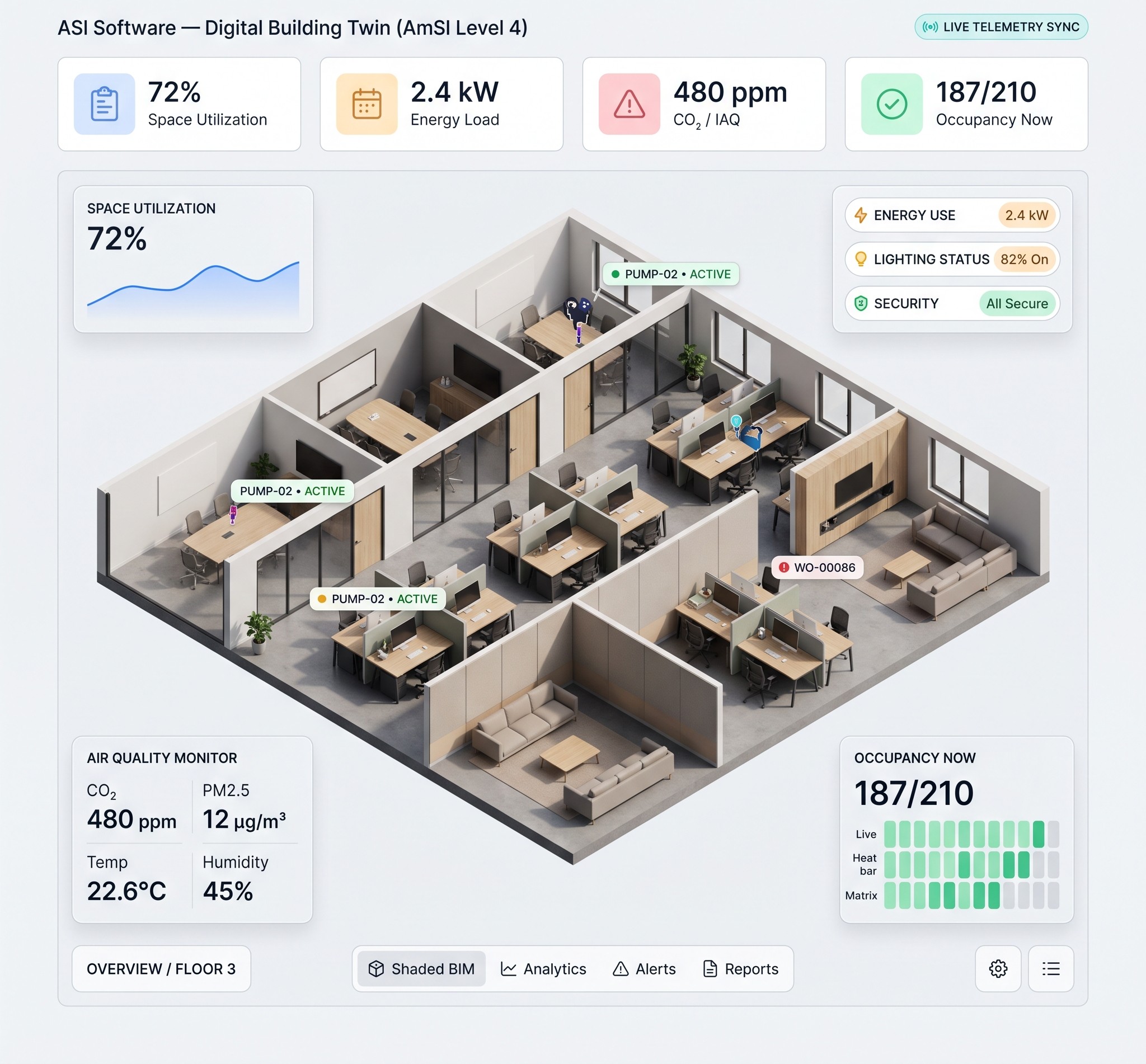
Extend your ASI Software workspace with a digital twin of your buildings.
  • Digital twin of your buildings
  • Lives in your ASI Software workspace
Available on desktop · tablet · mobile
ASI Software Digital Building Twin dashboard showing an isometric 3D office floor with live readings for space utilization, energy, air quality and occupancy

What Digital Building Twin gives you

A 3D model of your buildings and structures, built from our scans and connected to your asset data.

Included in Pro package for Municipal, Buildings and Poles and Towers

3D model from our scan

ASI scans your building or structure and builds an accurate 3D model of it.

Assets tagged in place

Equipment and components are linked to where they actually sit in the model.

Remote review

Review condition and components without sending someone to site.

Scan and point-cloud storage

Video, scans and point clouds are stored with the assets they describe.

One workspace

The twin lives in your ASI Software workspace alongside inventory, condition and plans.

How it works

  1. ASI scans the building or structure.
  2. The 3D model is loaded into your workspace.
  3. Assets and components are linked in place.
  4. Your team reviews and plans from the model.

Built for

Building owners, facility managers and operators of poles, towers and other structures.

Coming soon

Climate Adaptation Planner

The roads, bridges and buildings we look after today will carry our communities through the decades ahead, into a climate that is already changing. The Climate Adaptation Planner is being built to help you prepare for that future with care: to protect the places people call home, and to leave a stronger, safer and more resilient world for the generations who will inherit what we build.

Find the package that fits

Every feature is included in one of our three packages. See what's included.

Book a MeetingBook a demo
ASI Software multi-device interface

FAQ

Frequently Asked Questions

Quick answers to common questions about our free trial, user limits, data uploading, and platform access.

Is there a free trial?
⌄

Yes! Every new account includes a 14-day free trial, giving you full access to explore ASI Software before choosing a subscription.

What happens after my free trial ends?
⌄

At the end of your trial, you can choose the subscription plan that best fits your organization. If you decide not to subscribe, your account will simply become inactive.

How many users and storage are included?
⌄

Every tier includes unlimited users. Storage and assets scale by tier: Base 20 GB and 2,000 assets, Standard 200 GB and 5,000 assets, Pro 500 GB and 10,000 assets. Need more? Talk to our team about Enterprise.

Who will input our assets into ASI Software?
⌄

You can easily add and manage your assets yourself using ASI Software. If you'd prefer, the ASI Engineering team can handle the entire asset inventory process for you, including on-site asset collection, condition assessments, and importing your data into the system.

Where can I access ASI Software?
⌄

ASI Software is cloud-based, so you can securely access it from anywhere using a computer, tablet, or mobile device. As long as you have a stable internet or mobile data connection, you can upload, download, and manage your asset information wherever you are.

Can I change tiers?
⌄

You can move up a tier at any time. Moving down takes effect at your next renewal.

Is the software the same for every sector?
⌄

Base and Standard are identical across sectors. Pro contains the specialty modules that fit your assets, so a road authority and a building owner get different Pro packages at the same price.

Book a Demo
Confidence in Managing Your Infrastructure
© 2026 ASI Software Inc. (ASI Software). All rights reserved. Proudly serving our clients across Canada.
Darren Chatbot
Darren - Your Asset Management Expert Darren - Your AM Expert